
Microsoft Teams time tracking: clock in without leaving Teams
Your team already works in Teams all day. With the free TimeClock 365 app, they punch in, choose Home or Office and track time on tasks in the same window - and every minute lands in one attendance report, ready for payroll.
- Free Teams add-on
- Door access in Teams
- Azure AD sign-in
- ISO 27001 certified
Hello, Emily Carter.
Select your attendance type to start the day productively!
IP 203.0.113.24
You're on a break
Take your time. Click below when you're ready to get back to work.
My Time Off
Vacation12 days8 days after pending request
Sick leave5 days
- 23 - 26 OctVacation · 4 daysPending
My tasks
- Release 4.2 testingProject Atlas
- Client onboarding callsNorthwind Retail
- Quarterly review deckInternal
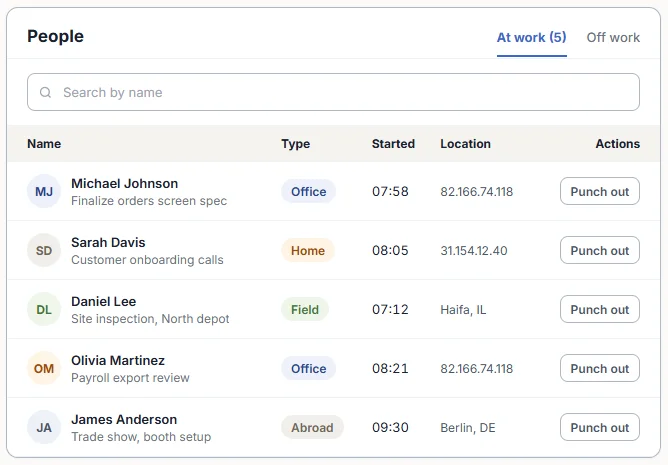
Who's working
- MJMichael JohnsonOffice · 07:58
- SDSarah DavisHome · 08:05
- DLDaniel LeeField · 07:12
Who's in
Inside 2
- OMOlivia MartinezMain entrance · 08:21
- JAJames AndersonLoading dock · 07:46
Left 1
- RWRyan WalkerMain entrance · out 12:40
On time off 1
- GKGrace KimVacation · back 26 Oct
New in the Teams app · October 2026
Door access, time off and contacts - now in Teams
The TimeClock 365 Teams app now covers your doors as well as your hours, in the same design as the TimeClock 365 web app.
Who's in - door access dashboard
For a chosen day: who is inside, who has left and who is on time off, with counts and how many door terminals are online. A note flags it when no door is online.
With door access control and the dashboard permission.Door event log
Door events grouped by day: who, in or out, which door and terminal, and when. Unregistered cards and denied attempts stand out. Search by name, person ID or card.
With the door access control permission.My Time Off
Request Time Off is the first button on the dashboard. My Balance opens in place and shows the tentative balance when a request is pending.
When the account's dashboard settings include it.Team Birthdays
Upcoming birthdays on the dashboard, with a countdown to each one.
When the account's dashboard settings allow it.Contacts
Search colleagues by name or email. See role, employee number and groups, and email or call them in one tap.
For users with permission to see users.A new look
The Teams app now uses the same design system as the TimeClock 365 web app, so both read as one product.
What is Microsoft Teams time tracking?
Microsoft Teams time tracking means employees record their work hours from inside Teams instead of opening a separate system. With TimeClock 365, the Teams app is another way into the same cloud attendance system your web portal, mobile app and time clocks use.
Punches from Teams follow the same contract rules for breaks and overtime, go through the same manager approvals and end up in the same payroll export. Nothing to reconcile.
In the Teams app
Everything your team can do without leaving Teams
Punch in and out
Start and end the workday in one click from the TimeClock 365 app in Teams.
Home or Office
Employees choose where they work today, so hybrid days are recorded correctly.
Time on tasks
Start a task, pause it, switch to another one. Hours go to the project and customer.
Attendance report
Employees view and edit their own attendance report from Teams.
Who's at work
Administrators see who is currently working, right inside Teams.
Contact support
Questions about the system? Reach TimeClock 365 support from the app.
Setup
Add TimeClock 365 to Teams in under a minute
No IT project. Employees use the TimeClock 365 account they already have.
- 1
Open Apps
Click the Apps button in Microsoft Teams.
- 2
Search TimeClock365
Find the TimeClock 365 app in the Teams app store.
- 3
Click Add
The app appears in Teams, ready to use.
- 4
Punch in
The first punch shows up in the attendance report instantly.
Office 365 & Microsoft 365
Time tracking that fits your Microsoft 365 setup
If your company runs on Office 365, TimeClock 365 plugs into what you already have. Employees punch in from Teams, sign in with their Microsoft work account, and managers get the full picture in one dashboard.
- Teams app - punch in, tasks and the attendance report in Teams
- Single sign-on with Azure Active Directory (Microsoft Entra ID) over SAML
- User sync from Azure AD, so new hires are ready on day one
- ISO 27001 certified cloud, used in 20+ countries in 12 languages
One timesheet
Teams for the office, other ways for everyone else
Not everyone sits in Teams. Mix methods per employee - all punches go into the same report.
| Clock-in method | Best for | How they punch |
|---|---|---|
| Microsoft Teams | Office and hybrid staff who work in Teams | Punch in and start tasks in the Teams app |
| Chrome extension | Desk workers who switch tasks often | One click in the browser toolbar |
| Mobile app | Field and remote teams | iOS or Android, with GPS location |
| Time clock | Sites with a shared entrance | Fingerprint, face, card or PIN |
| Door access | Offices that control who gets in | The first door entry starts the day |
Attendance from the door
Already badging in? That can be the punch.
With TimeClock 365 door access control, attendance and access share one account. The first card, phone or fingerprint at the door can start the workday and the last exit can end it - no separate clock-in needed for on-site days. Hybrid staff punch in from Teams on home days.
See door access control →Pricing
Teams app included. Attendance from $3.90 per user / month
Billed annually. Attendance + Access Control is $4.90. 14-day free trial, no credit card.
Microsoft Teams time tracking - FAQ
Can you track time in Microsoft Teams?
Yes. With the TimeClock 365 app for Microsoft Teams, employees punch in and out, choose whether they work from home or the office, and track time on tasks without leaving Teams. Every punch goes into the same TimeClock 365 attendance report used for overtime and payroll.
How do I add TimeClock 365 to Microsoft Teams?
In Microsoft Teams, click Apps, search for TimeClock365 and click Add. The app then appears in Teams and employees can punch in from it. A step-by-step guide is available in the TimeClock 365 support center.
Does the Teams app cost extra?
No. The Microsoft Teams add-on is free for TimeClock 365 customers. You pay only for your TimeClock 365 plan - attendance starts at $3.90 per user per month, billed annually, with a 14-day free trial.
Can employees track time on tasks and projects in Teams?
Yes. At the start of the day an employee opens TimeClock 365 in Teams, chooses Home or Office and starts a task. They can pause it and start another task, and click Punch out at the end of the day. Task hours appear in project and customer reports.
Can managers see who is working from inside Teams?
Yes. Administrators can see who is currently at work in the TimeClock 365 Teams app. Employees can view and edit their own attendance report there. The full manager dashboard, approvals and payroll exports are in the TimeClock 365 web portal.
Can I see who is in the building from Microsoft Teams?
Yes, for accounts that use TimeClock 365 door access control and have permission for it. The Who's in page in the Teams app shows, for a chosen day, who is currently inside, who has left and who is on time off, with counts for each and how many door terminals are online. If no door is online, the page says so, so an empty building is not confused with an unmonitored one.
Can I see the door access event log in Teams?
Yes, with the door access control permission. The door event log in the Teams app lists door events grouped by day with a total per day: who passed, in which direction, through which door and terminal, and when. Unregistered cards and denied attempts are highlighted, and events can be searched by name, person ID or card number.
Can employees request time off from Microsoft Teams?
Yes. When the account's dashboard settings include it, the My Time Off block on the Teams dashboard puts Request Time Off first and lists the employee's requests. My Balance opens in place and shows a tentative balance when a pending request would change it.
Can I find a colleague's email or phone number in the Teams app?
Yes, for users with permission to see users in TimeClock 365. The Contacts page lets them search colleagues by name or email and shows role, employee number and groups, with buttons to email or call.
Does TimeClock 365 work with Office 365 and Microsoft 365?
Yes. Besides the Teams app, TimeClock 365 supports SAML single sign-on with Azure Active Directory (Microsoft Entra ID), so employees sign in with their Microsoft work account, and users can be synced from Azure AD. TimeClock 365 is ISO 27001 certified.
What if some employees do not use Teams?
They clock in another way - the web portal, the iOS or Android app, the Chrome extension, Slack, a biometric time clock, or the door itself if you use TimeClock 365 access control. All methods record into the same timesheet.
Related
See TimeClock 365 running inside your Teams
Book a 30-minute demo - we'll show the Teams app, the manager dashboard and the payroll export.