
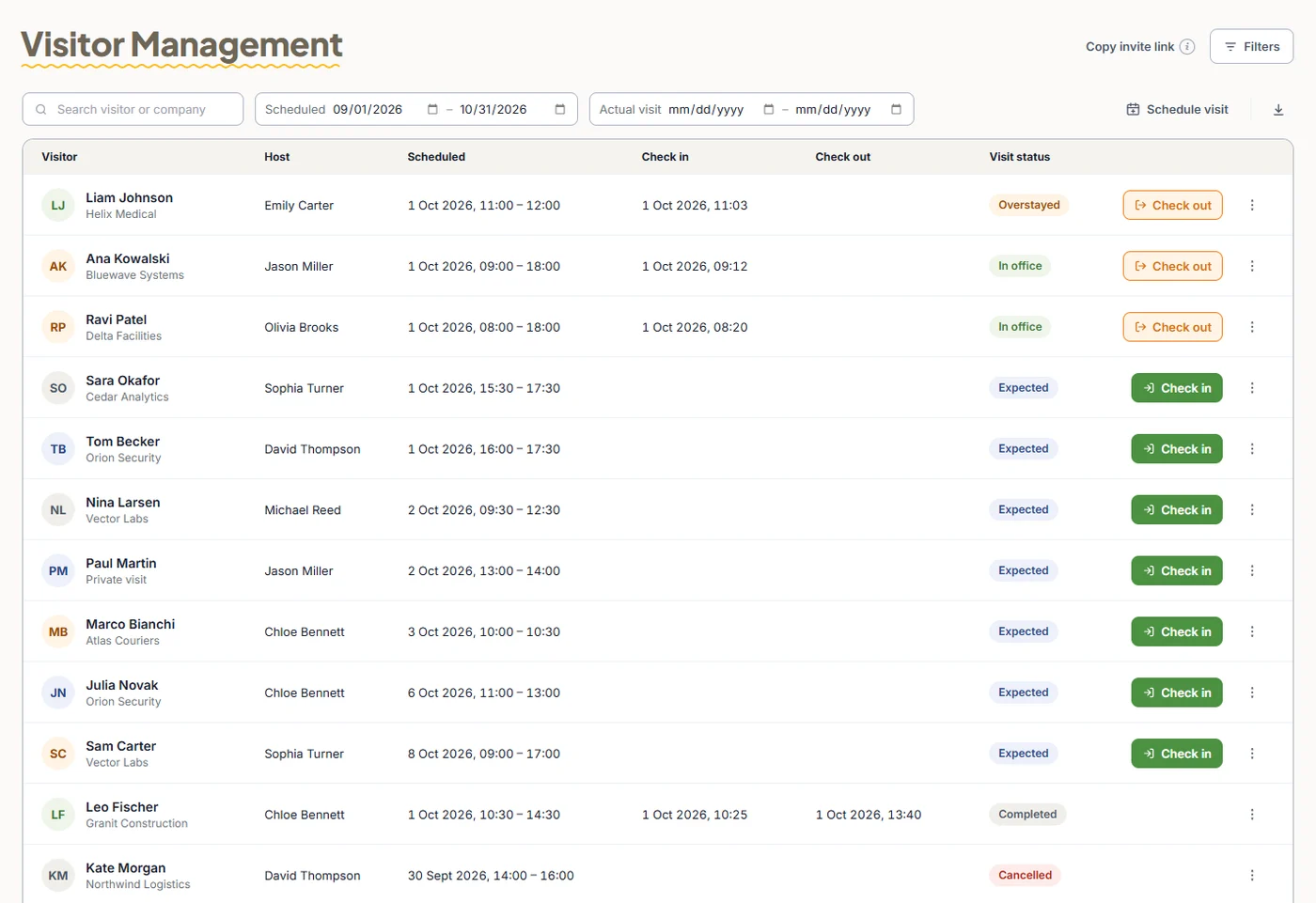
The visitor list
Every visit with host, scheduled time, check-in, check-out and status. Search by visitor or company, filter by scheduled or actual dates, and download.
Add-on·$122/month flat(€112/month flat)
Pre-register guests and contractors, send email invitations, check visitors in and out with ID verification, and spot overstays in real time. Give guests door access only to the doors you choose, only during the visit.
Confirm each step to start the visit.
Visitor Management is a TimeClock 365 add-on for $122/month flat - one price for the whole account, with no per-visitor fees. It lets reception pre-register guests and contractors, send email invitations, check visitors in and out with ID verification, and see overstays in real time.
Because it runs on TimeClock 365 cloud door access control, a visitor can get a credential tag that opens only the selected doors, only during the visit - and access is revoked at check-out. TimeClock 365 is ISO 27001 certified, works in 12 languages and is used in 20+ countries.
Benefits
Visitors are pre-registered with ID details, so check-in takes three confirmations instead of a form at the counter.
Time-limited access to the doors you pick, revoked the moment the visitor checks out.
Expected, In office and Overstayed statuses show reception and security who is in the building right now.
How it works
Enter the visitor, time, host and reason. The invitation goes out by email when you save.
Confirm the check-in time, that the ID was verified and that a credential was issued.
The visitor's credential tag opens only the selected doors, only during the visit.
Confirm the time and the returned credential. Door access is revoked and the visit is logged.
Features
Real screens from the English TimeClock 365 demo account, with sample data.
Every visit with host, scheduled time, check-in, check-out and status. Search by visitor or company, filter by scheduled or actual dates, and download.
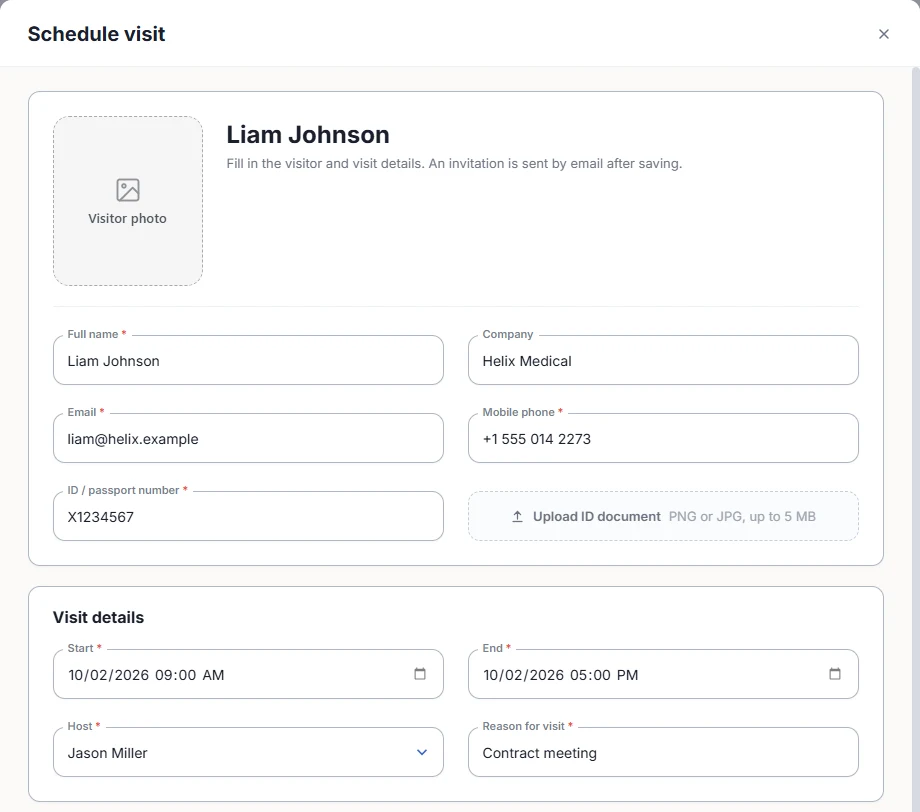
Full name, company, email, mobile phone, ID or passport number, a photo and an ID document, start and end time, host and reason. Required fields are checked before you save.
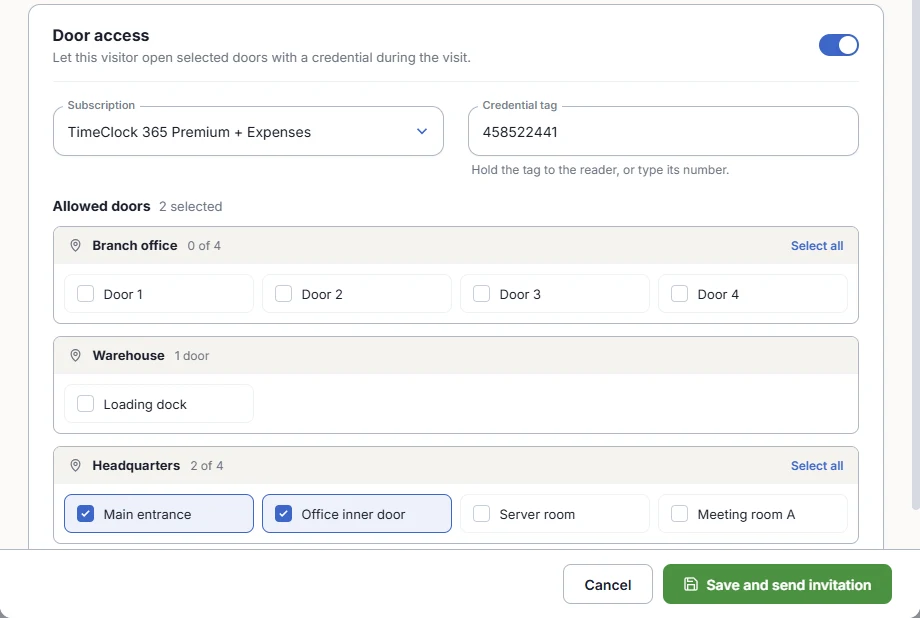
Switch on door access, assign a credential tag and tick the allowed doors by location, with Select all per site. Save and send the invitation in one click.
A visitor still inside after the scheduled end time shows as Overstayed, so reception can follow up.
Copy one invite link and share it, so visitors can register themselves before they arrive.
Visitor door entries are recorded with your employees' access events in TimeClock 365 door access control.
Learn more →Who it's for
Guests and job candidates are expected, checked in and checked out from one list.
Visitors open only the doors they need, and overstays are visible at a glance.
Contractors get access to the work area only, for the hours of the job.
Know who is on site, and keep restricted rooms closed to visitors.
Compared with
| Task | Spreadsheets & email | TimeClock 365 Visitor Management |
|---|---|---|
| Pre-registration | Email threads and a list at reception | Schedule visit form with an email invitation, or an invite link |
| Check-in | A paper logbook | Check-in time, ID verified and credential issued, in three steps |
| Guest door access | Lend a card and remember to get it back | Credential tag for selected doors, only during the visit |
| Who is in the building | Count names in the logbook | Live statuses: Expected, In office, Overstayed, Completed |
| Records | Paper pages to archive | Search, filter and download the visit list |
Pricing
€112/month flat in euros. One price for the whole account, not per employee. Add it to any TimeClock 365 plan, or switch it on in your demo first - free during the demo.
$1.90 per user/month, billed annually
Cloud door access control for your employees - the doors and readers Visitor Management uses.
Learn more →$4.90 per user/month, billed annually
Door access and time attendance in one account - every door entry can clock the employee in.
Learn more →TimeClock 365 Visitor Management is an add-on for scheduling and tracking guests, contractors and couriers: who is coming, who they are visiting, when they arrived and left, and which doors they may open. Visits sit in the same cloud account as your employees, door access control and reports.
TimeClock 365 Visitor Management costs $122/month flat (€112/month flat) - one price for the whole account, with no per-visitor fees. You can switch it on in your demo account for free before you buy.
In TimeClock 365, reception or the host schedules the visit in one form - full name, company, email, mobile phone, ID or passport number, a photo and an uploaded ID document, the start and end time, host and reason - and an invitation is sent by email on save. You can also copy an invite link and share it.
In TimeClock 365, turn on door access for the visit, assign a credential tag (hold it to the reader or type its number) and tick the allowed doors, grouped by location. The visitor can open only those doors, only during the visit, and access is revoked at check-out.
Reception clicks Check in and confirms three steps: the check-in time, that the visitor's ID was verified, and that a credential was issued. At check-out, reception confirms the time and that the credential was returned, and TimeClock 365 revokes the visitor's door access.
Yes. TimeClock 365 keeps every visit with the visitor, company, host, scheduled time, check-in and check-out time and status. Search by visitor or company, filter by scheduled or actual visit dates, and download the list.
Expected - the visit is scheduled. In office - the visitor checked in. Overstayed - the visitor is still in the building after the scheduled end time. Completed - the visitor checked out. Cancelled - the visit was cancelled.
Yes. In TimeClock 365, contractors are scheduled as visits with time-limited door access to the areas they need, and every visit is kept in the visitor list. Employee access, visitor access and the door log are managed in the same account.
TimeClock 365 Visitor Management uses the doors, controllers and readers you already manage in TimeClock 365 door access control. Door hardware is quoted per building.
Switch on Visitor Management in your TimeClock 365 demo and try it with sample data - or let us walk you through it.