
Know where every working hour goes
Employees start a task with one click - in the dashboard, the app, Teams or right inside Jira. You see hours by task, project and customer, without timesheets to chase at the end of the month.
- Jira, Trello & Monday
- Time budgets
- Linked to attendance
- Status syncProject Atlas0:00:00
- Acceptance testingRelease 4.20:00:00
- Finalize configurationPayroll module rollout0:00:00
- Service agreementClient onboarding0:00:00
Try it - start a task, then switch to another
Report time where you work
Start a task from anywhere
Every method records into the same task reports - and into the same attendance day.
Jira, Trello & Monday
A Start task button inside your tickets with the Chrome extension.
Jira extension →On the dashboard
Tasks right next to the punch-in button
Each employee sees the tasks assigned to them on the dashboard. Start one, pause it, switch to the next - and see what was reported today. Managers can add a new task from the same screen.
- My tasks - only what's assigned to you, searchable
- Reported today - the time already logged per task
- New task - create and assign in seconds
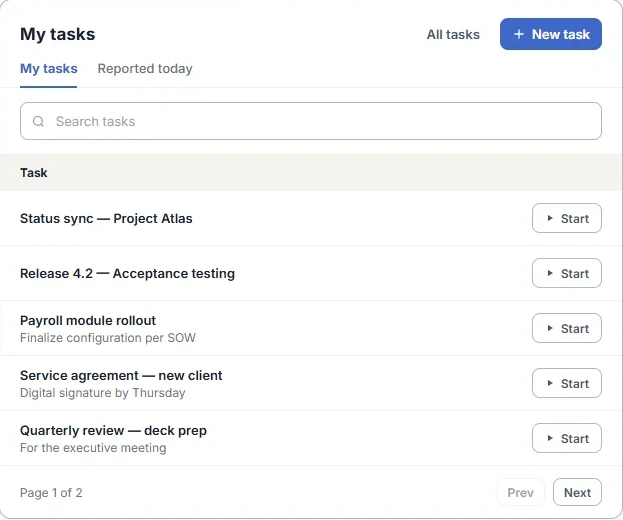
Illustration with sample data
Projects & tasks
Customers, projects and tasks - your way
Group tasks under projects and projects under customers. Assign each task to employees or whole groups, and they're notified right away.
- Time budget, start and end dates per task
- Type, category and priority to organize the work
- Customer → project → task selection order, if you require it
- Duplicate projects to start new ones faster
Stay in control
Accurate task hours, without micromanaging
Task required at clock-in
The clock only starts once a task is selected - on the app, the web or both. Guide
Status alerts
Get an email when an employee starts, pauses or completes a task. Guide
End tasks centrally
Admins can end a task for all users, or one employee's report on it. Guide
Late reports, marked
Task hours added after 24 hours are flagged as retroactive, with comments. Guide
Same day as attendance
Task time sits inside the attendance day, so hours always add up.
Smart Wizard
Fill missing hours and complete tasks automatically. Guide
Reports
Hours by project, task and employee
The Tasks Detailed Report shows who worked on what, and for how long, for any period. Download it to Excel with an overtime summary by task or a summary per employee - ready for billing, costing or grant reports.
- Tasks Detailed Report filtered by employee, project or period
- Overtime by task for every employee
- Excel export for billing and costing
Illustration with sample data
R&D and grants
Israel Innovation Authority reporting, built in
Mark projects as IIA-linked and employees report attendance and tasks as usual. At month-end, a three-step Smart Wizard fills missing hours, allocates them to tasks and sends the report for approval.
IIA reporting →- 1Fill missing timesheets
- 2Allocate hours to tasks
- 3Approve and submit
Integrations
Works with the tools your team already uses
Frequently asked questions
How do employees track time on tasks?
They click Start on a task in the web dashboard, the mobile app, Microsoft Teams or the Chrome extension, then pause it, switch to another task or punch out. The time is recorded against the task and its project automatically.
Can employees start tasks from Jira, Trello or Monday.com?
Yes. With the TimeClock 365 Chrome extension, a "Start task" button appears inside Jira, Trello and Monday.com items. The timer runs in TimeClock 365 and the hours land in the task reports.
Can I require a task when employees clock in?
Yes. In the work agreement you can make starting a task mandatory right after punch-in, separately for the mobile app and the web portal. The clock only starts once a task is selected.
How are projects and tasks organized?
Tasks belong to projects, and projects can belong to customers. Each task can have assigned employees or groups, a time budget, start and end dates, a type and a priority. You can require employees to choose customer, then project, then task.
Can hours be added to tasks after the fact?
Yes. Employees can report attendance and add task hours later in Time Entries for Tasks, with a comment. Entries made more than 24 hours later are marked as retroactive.
Which task reports are available?
The Tasks Detailed Report shows hours by employee, task and project for any period, with Excel downloads including an overtime summary by task and a summary by employee.
Does it support Israel Innovation Authority reporting?
Yes. Mark projects as IIA-linked, and employees approve the monthly IIA report with a Smart Wizard that fills missing hours and allocates them to tasks.
Which plans include task tracking?
Task and project tracking is part of the Professional and Premium plans. You can try everything free for 14 days.
Setup guides
Create projects and tasks
And assign employees or groups.
Report tasks and hours
Web, app, Teams, Chrome, Jira.
Require a task at clock-in
For the app and the web.
Track tasks from Jira
With the Chrome extension.
Report tasks via Monday.com
Start tasks on Monday items.
Duplicate a project
Reuse tasks and settings.
See where your team's time really goes
Start a 14-day free trial - no credit card, no setup fee.