
Document Manager
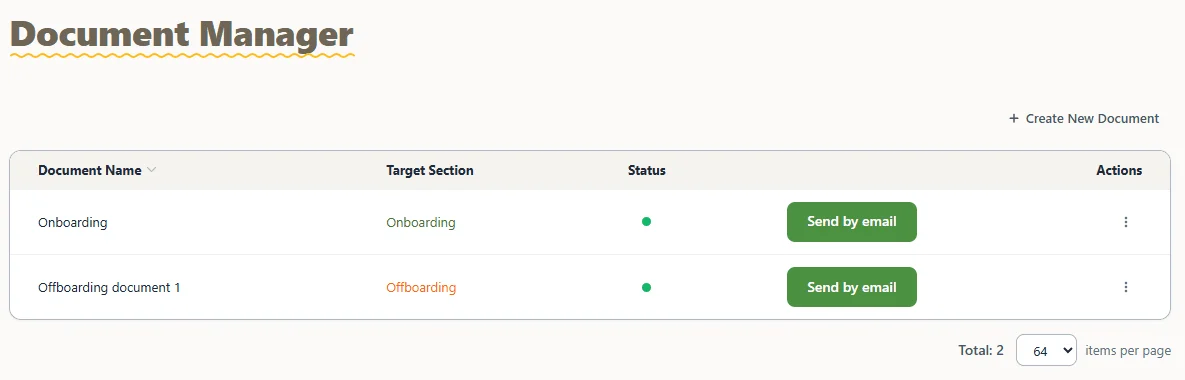
All your HR documents in one list, with the target section (Onboarding or Offboarding), status and a "Send by email" button.
Read the guide →Add-on·$1 per employee/month(€1 per employee/month)
Send onboarding and offboarding documents for signature, keep every employee's files and scans in their profile, and see your organization chart - in the same account that runs attendance, time off and door access.
Permission level
Sees, edits and approves the reports and time off of their groups.
Try it - send the document, switch tabs. Sample data.
The HR Module is a TimeClock 365 add-on for $1 per employee/month. It adds onboarding and offboarding documents, a Document Manager for digital documents with a signature field, employee files and scans in each employee's profile, HR conversations with each employee in their profile, and an organization chart.
It runs in the same cloud account as attendance, time off and door access control, so each employee is added once and their documents, hours and leave stay together. TimeClock 365 is ISO 27001 certified, works in 12 languages and is used in 20+ countries.
Benefits
Build the welcome pack once, with a signature field, and email it to every new hire. No printing, scanning or chasing.
Onboarding, files and scans, forms and offboarding sit in the employee's profile - not in someone's inbox or a shared drive.
The same employee record drives attendance, time off, payroll export and door access. One list to keep up to date.
How it works
Turn on the HR module in your demo with "Choose What to Try in Your Demo", or ask us to add it to your account.
In Document Manager, add a title, text blocks and a signature field, and choose Onboarding or Offboarding.
Click "Send by email" in Document Manager, or "Send Document" from an employee's profile.
Documents and uploaded files stay in the employee's profile under HR Module > Documents.
Features
Real screens from the English TimeClock 365 demo account, with sample data.
All your HR documents in one list, with the target section (Onboarding or Offboarding), status and a "Send by email" button.
Read the guide →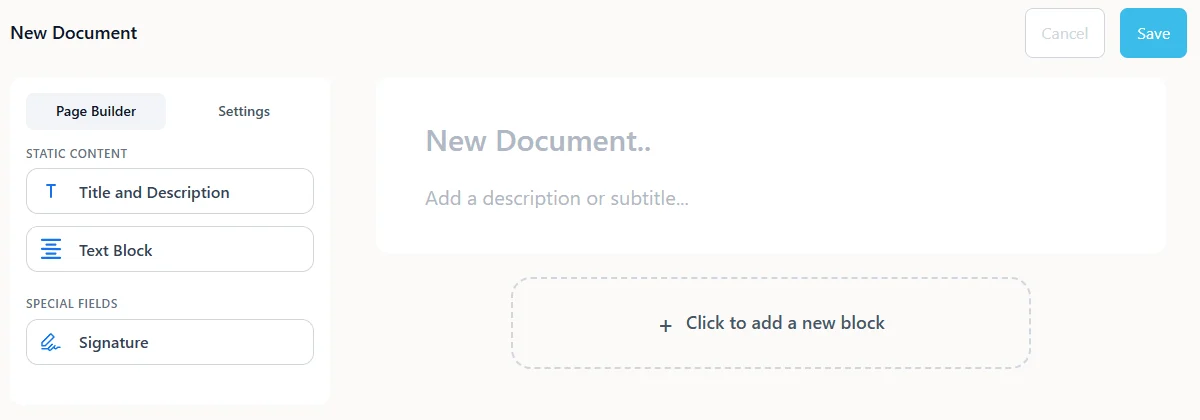
Create a document from a title and description, text blocks and a signature field. Edit it once, send it as often as you need.
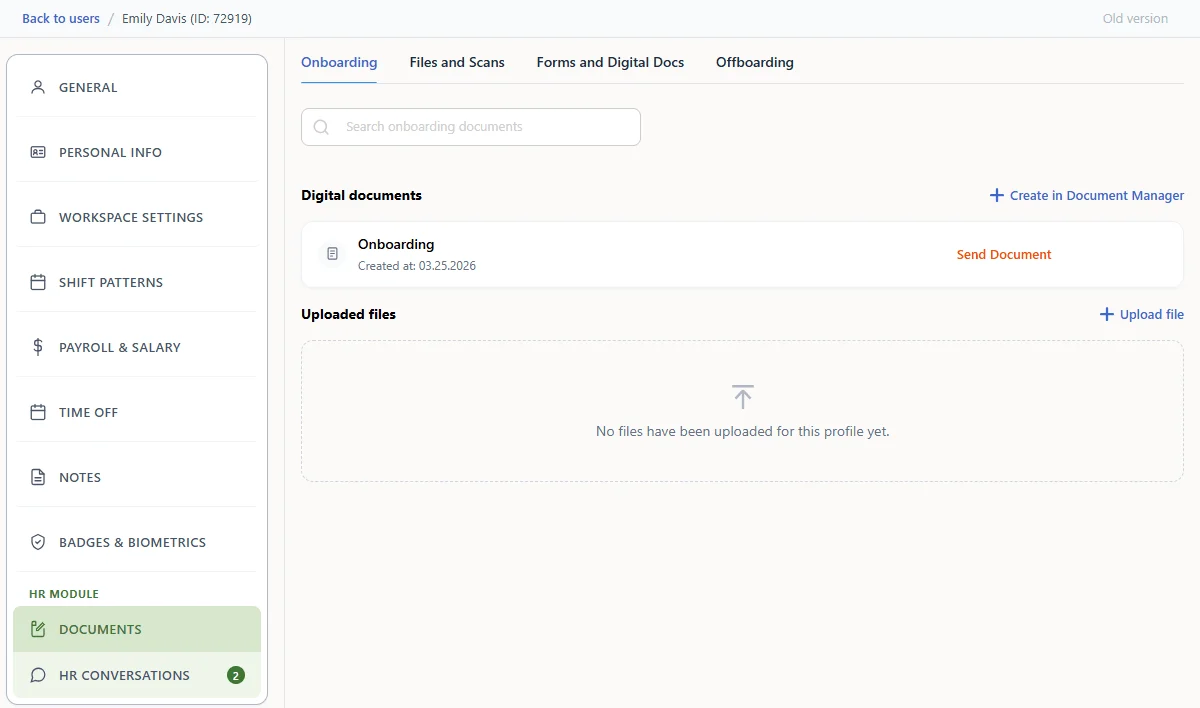
Each profile has four tabs: Onboarding, Files and Scans, Forms and Digital Docs, and Offboarding. Upload ID copies, certificates and signed forms next to the digital documents.
Keep HR conversations with each employee in their profile, under the HR Module section next to their documents.
See the structure of your company in the same system where you manage people, hours and door access.
Send offboarding documents to employees who are leaving and keep them in the profile. Set an end date and the employee can no longer punch in, while their history stays.
Read the guide →Groups, managers, permission levels and the self-registration link for new hires are already in every plan. The HR Module adds the documents on top.
Read the guide →Who it's for
Onboarding packs and policies go out the same way for every new hire, and come back to one place.
Employee files sit next to hours, time off and payroll export - no second system to check.
Collect signed documents from every site and team without paper.
Hiring every month? Build the documents once and send them in a click.
Compared with
| Task | Spreadsheets & email | TimeClock 365 HR Module |
|---|---|---|
| Sending onboarding documents | Email attachments, replies tracked by hand | Sent from Document Manager by email |
| Signatures | Print, sign, scan and file | Signature field in the digital document |
| Where files live | Shared drives and inboxes | The employee's profile, in four tabs |
| Updating a policy | Edit the file and find who needs it | Edit once in Document Manager, then send |
| Hours, time off and doors | Separate files and systems | Same TimeClock 365 account and employee list |
Pricing
€1 per employee/month in euros. Billed for each employee in the account. Add it to any TimeClock 365 plan, or switch it on in your demo first - free during the demo.
$3.90 per user/month, billed annually
Clock-in from 8 methods, time off, overtime rules and payroll export for the same employees.
Learn more →$4.90 per user/month, billed annually
Door access and attendance in one account - every door entry can start the workday.
Learn more →$325/year flat
Leave balances that update themselves from each contract's accrual schedule.
Learn more →The TimeClock 365 HR Module adds onboarding and offboarding documents, a Document Manager for digital documents with a signature field, employee files and scans stored in each employee's profile, HR conversations with each employee in their profile, and an organization chart. It runs in the same cloud account as attendance, time off and door access control.
The TimeClock 365 HR Module costs $1 per employee/month (€1 per employee/month). It is an add-on to any TimeClock 365 plan, and you can switch it on in your demo account for free before you buy.
Yes. In TimeClock 365 Document Manager you build a document from a title, text blocks and a signature field, choose whether it belongs to Onboarding or Offboarding, and send it to the employee by email. The document is kept in the employee's profile under HR Module > Documents.
Yes. TimeClock 365 covers all three in one account: the HR Module handles onboarding and offboarding documents and employee files, and time off requests, approvals and the Time Off Calendar track absences next to attendance and payroll export.
In TimeClock 365, every employee profile has an HR Module > Documents section with four tabs: Onboarding, Files and Scans, Forms and Digital Docs, and Offboarding. Digital documents from Document Manager and uploaded files sit side by side, so HR does not need a separate shared drive.
Yes. The HR Module uses the same employee list as TimeClock 365 attendance, time off and payroll export. You add an employee once, and their documents, working hours and leave are all in one profile.
Yes. In TimeClock 365, door access permissions belong to the same employee record as HR documents and attendance, so HR and security work from one list. When someone leaves, set an end date and remove their door permissions in the same account. After the end date the employee can no longer punch in.
Yes. In your TimeClock 365 demo account, click "Choose What to Try in Your Demo", switch on the HR module and click Save changes. It is free during the demo.
TimeClock 365 is ISO/IEC 27001:2022 certified. Access to employee data is controlled by permission levels and roles, with single sign-on and two-factor login. TimeClock 365 is available in 12 languages and used in 20+ countries.
Create and send documents.
Switch on the HR module for free.
Let new hires fill in their own details.
Create users and set them up.
Who approves whose hours.
When someone leaves.
Switch on HR Module in your TimeClock 365 demo and try it with sample data - or let us walk you through it.