
Retail & hospitality access control with shifts tracked from the door
For stores, restaurant chains and hotels. Control who opens the stockroom, cash office and kitchen - and let the staff door clock people in.
- Multi-site
- Cards, phones, face
- ISO 27001 certified
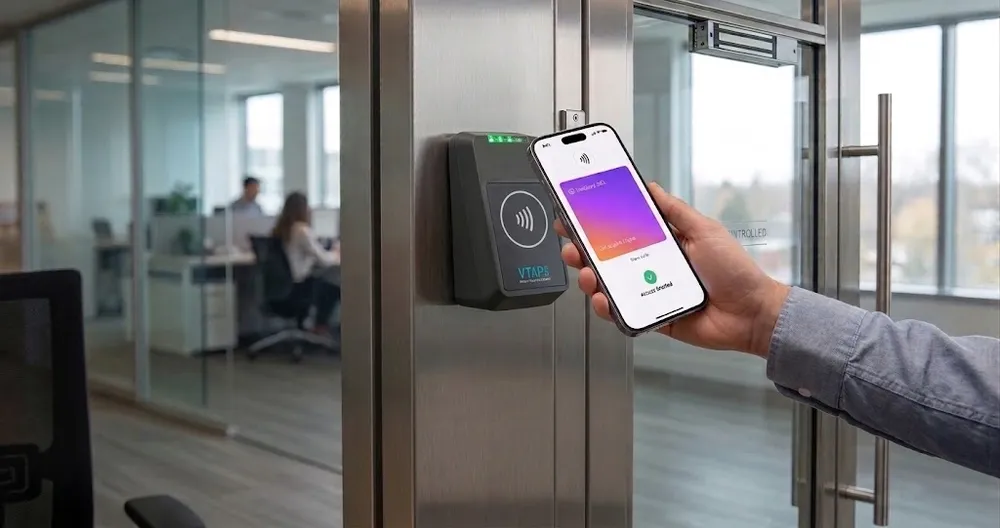
What is access control for retail and hospitality?
It decides which employees can open which doors, at which times, across every store, restaurant or hotel you run. Keys get copied and lost. High staff turnover makes it worse.
TimeClock 365 replaces keys with cards, fobs, biometrics or phone keys, managed from one cloud portal. Add attendance, and the same door entry becomes the start of the shift.
The problems
Door and shift problems in stores, kitchens and hotels
Lost and copied keys
High turnover means keys walk out the door. Re-keying every time costs money.
Stockroom and cash office
Only managers should open them - and you want to know who did.
Early opens, late closes
Bakers, cleaners and night staff need access outside opening hours.
Buddy punching
Shared time clocks let one employee clock in for another.
Many locations
Each store or venue runs its own keys and paper timesheets.
Deliveries and contractors
Someone has to be there to open the back door.
Door access control
Every staff door, every location, one portal
TimeClock 365 is first a cloud door access control system. Give each role the doors and hours it needs, and change it from anywhere.
- Cards, fobs, fingerprint, face or mobile wallet keys
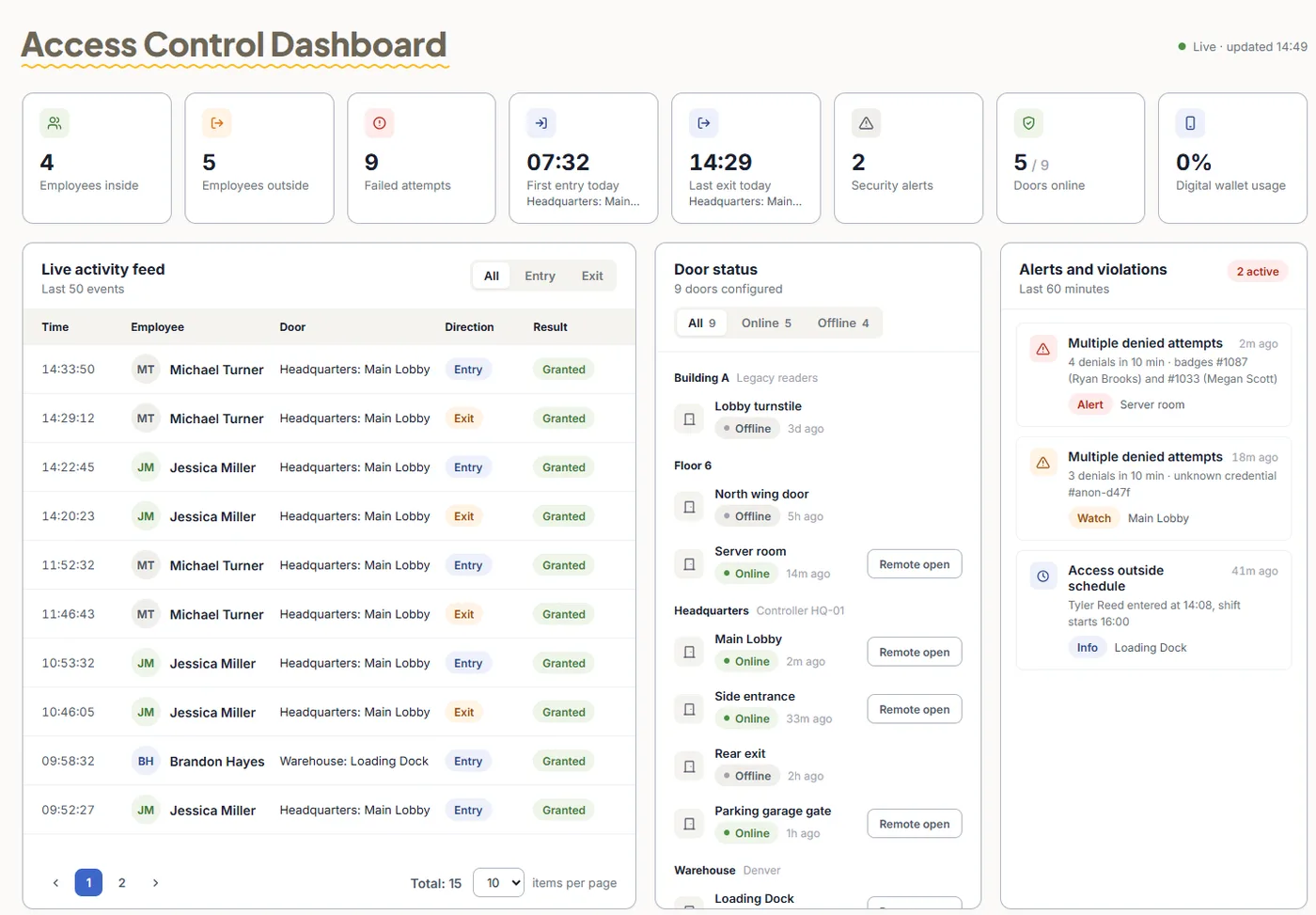
- Schedules per door - the stockroom opens only for managers on shift
- Remote unlock from the app for a delivery or a locked-out manager
- Live log of every entry and denied attempt, per site
Add-on: attendance from door entries
The staff door is the time clock
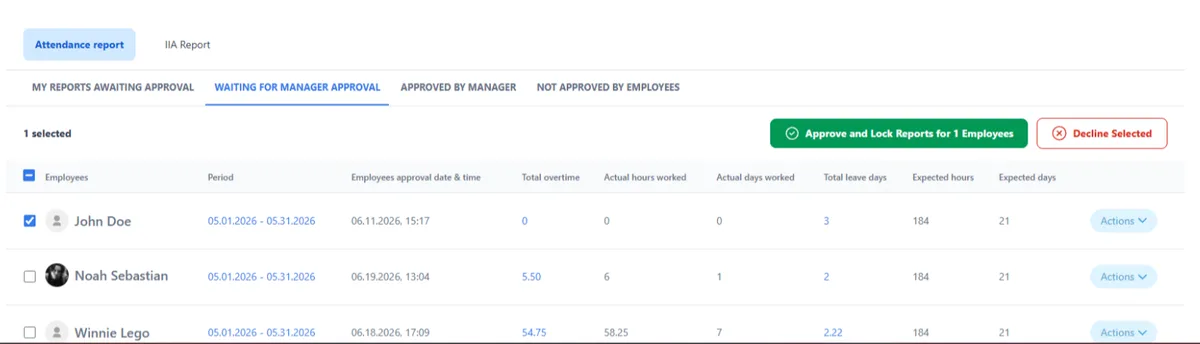
Add attendance and you no longer need a separate punch clock. Hours come from real entries, so nobody clocks in for a friend.
- First entry starts the day, last exit ends it
- Overtime and missed punches flagged for approval
- Payroll export to QuickBooks, HiBob and more
- Multi-site - every location in one account
Use case (fictional example)
A three-store chain opening on Saturday
- At 6:40, Dana (fictional) taps her card on the staff door of the downtown store. The door opens and her shift starts.
- At 7:15, a supplier arrives. The store manager unlocks the back door remotely from the app. The log records it.
- At noon, a seasonal worker who left on Friday tries his old card. Access was revoked in the portal - the door stays closed.
- On Monday, the area manager approves hours for all three stores and exports them to payroll.
Pricing
Door access control from $1.90 per user / month
Attendance + Access Control is $4.90 per user / month, billed annually. Mobile wallet keys - pricing on request. Readers and controllers are quoted per site.
Frequently asked questions
What is access control for retail stores and restaurants?
Access control for retail and hospitality decides which staff can open which doors - back office, stockroom, cash room, kitchen, staff entrance - and when. TimeClock 365 is a cloud door access control system: staff open doors with a card, fob, fingerprint, face or mobile wallet key, and managers see every entry in a live log.
Can door entries replace a separate time clock in a store or hotel?
Yes. With the TimeClock 365 attendance add-on, the first entry through the staff door starts the shift and the last exit ends it. Hours flow into timesheets with overtime rules applied, and approved hours export to payroll.
How do we manage several stores, restaurants or hotels?
TimeClock 365 is multi-site. All locations, doors and staff sit in one cloud account. Head office sees every site, and each store or venue manager sees only their own team and doors.
What happens when a seasonal or part-time employee leaves?
You remove their access in the TimeClock 365 web portal and it stops working on every door at every site. There is no need to collect keys or re-key locks.
Can we let in delivery drivers and contractors?
Yes. TimeClock 365 visitor management registers guests and contractors, and managers can unlock a door remotely from the app for a delivery. Every unlock is recorded in the log.
Is TimeClock 365 secure?
TimeClock 365 is certified to ISO/IEC 27001:2022 and works in line with GDPR. It is available in 12 languages and used in 20+ countries.
How much does it cost?
TimeClock 365 door access control starts at $1.90 per user per month. Attendance + Access Control is $4.90 per user per month, billed annually. Mobile wallet keys are priced on request, and readers are quoted per site.
Related
See it working in a store or hotel
Book a 30-minute demo and get a quote for your doors and staff.