
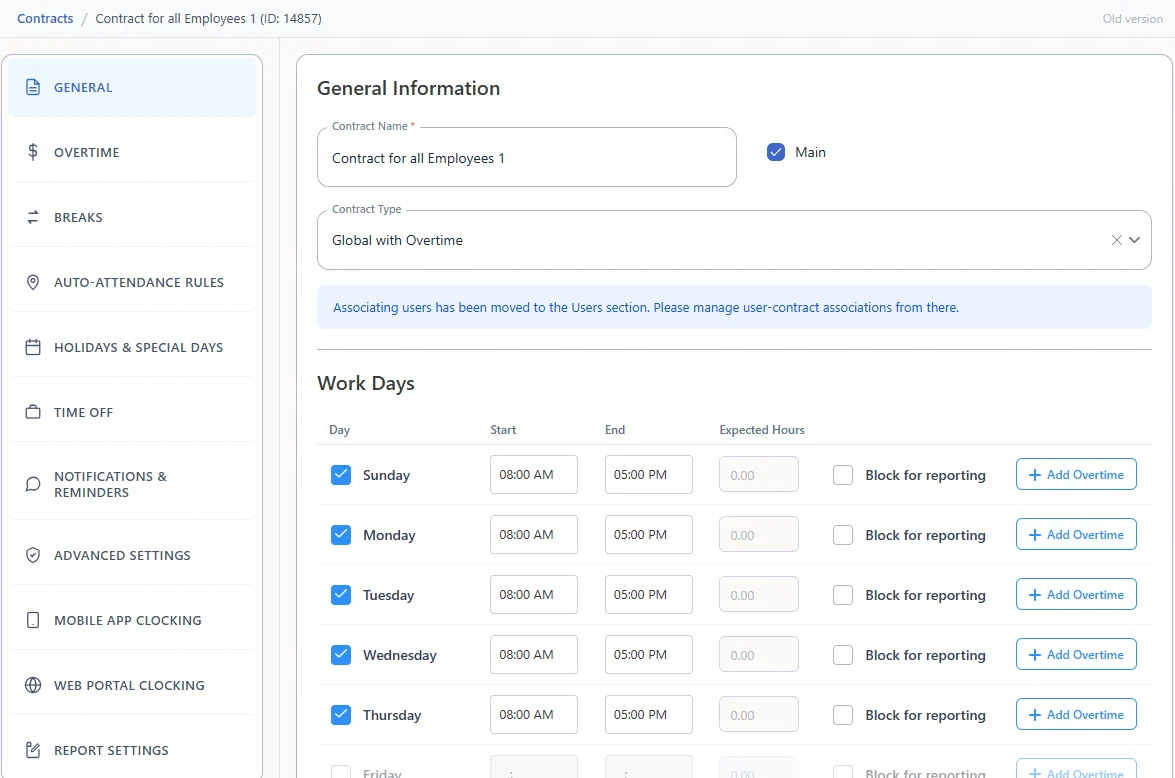
Work rules in contracts
In TimeClock 365, work rules live in contracts (work agreements): work days and hours, overtime, breaks, auto-attendance rules, holidays and special days, time off, notifications, and mobile and web clocking.
Add-on·$122/year flat(€112/year flat)
Keep your attendance policies in one place, let sites and departments differ only where they must, and sync changes automatically. Export the policies whenever HR or auditors ask.
Company policy · daily break
Try it - change the company break, sync, then export. Sample data.
Multi-Site Policy Manager is a TimeClock 365 add-on for $122/year flat - one price for the whole account. It adds centralized policy management, different rules per site or department, automatic policy sync, and policy export for compliance reviews.
It is built for companies with several sites, branches or departments that run attendance in one TimeClock 365 account. TimeClock 365 is ISO 27001 certified, works in 12 languages and is used in 20+ countries.
Benefits
Company policies live in one place instead of a document per site.
Sites and departments can follow different rules where the work is different.
Automatic sync means a policy change doesn't have to be repeated site by site.
How it works
We look at your sites and departments with you and add the add-on to your account.
Define the policies most sites share, in one place.
Set different rules for the sites or departments that need them.
Policies sync automatically; export them when HR or auditors need to review.
Features
Real screens from the English TimeClock 365 demo account, with sample data.
In TimeClock 365, work rules live in contracts (work agreements): work days and hours, overtime, breaks, auto-attendance rules, holidays and special days, time off, notifications, and mobile and web clocking.
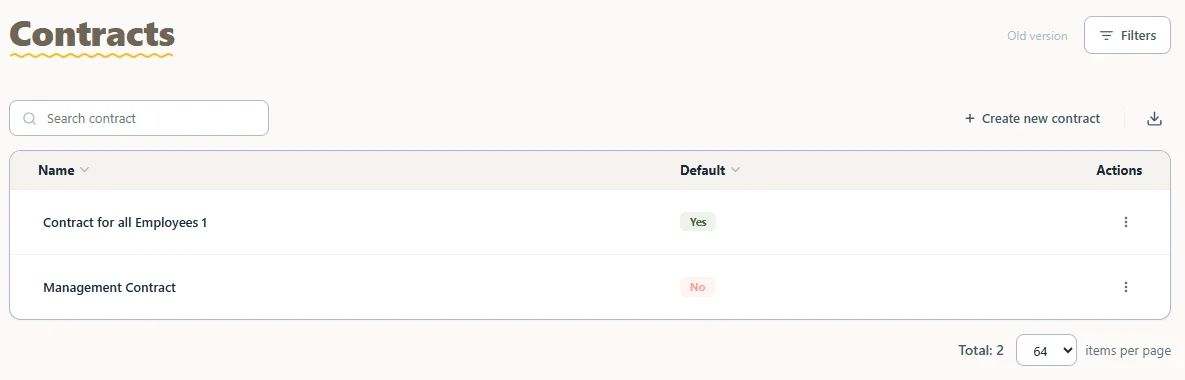
Create several contracts, mark one as the default, and assign employees to the contract that fits them.
Manage the policies of all your sites from one place.
Let a warehouse, a branch or a department follow its own rules where needed.
Policy changes sync automatically instead of being repeated site by site.
Export your policies so HR, auditors and site managers can review them.
Who it's for
Many branches, mostly the same rules, a few local differences.
Shift sites and offices with different working patterns.
One place to see and change the rules every site follows.
Sites that need local rules, in a system that works in 12 languages.
Compared with
| Task | A document per site | TimeClock 365 Multi-Site Policy Manager |
|---|---|---|
| Where the rules live | Separate files at each site | Managed centrally in TimeClock 365 |
| Local differences | Copied and edited by hand | Different rules per site or department |
| Changing a rule | Email every site manager | Change once, synced automatically |
| Reviews and audits | Collect files from every site | Export the policies |
Pricing
€112/year flat in euros. One price for the whole account, not per employee. Add it to any TimeClock 365 plan.
$3.90 per user/month, billed annually
Clock-in from 8 methods, time off, overtime rules and payroll export for every site.
Learn more →$4.90 per user/month, billed annually
Door access and attendance for every building in one account.
Learn more →$8.50 per user/month, billed annually
Crews that work across many sites, with GPS, geofencing and routes.
Learn more →Multi-Site Policy Manager is a TimeClock 365 add-on for companies with several sites or departments. It adds centralized policy management, different rules per site or department, automatic policy sync, and policy export for compliance reviews - in the same account that runs attendance and door access for every site.
TimeClock 365 Multi-Site Policy Manager costs $122/year flat (€112/year flat) - one price for the whole account, not per site or per employee.
TimeClock 365 does. All your sites run in one cloud account: employees clock in by mobile app with a geofence per site, biometric or NFC clocks, the web portal or Microsoft Teams, and managers see every site in the same reports. Multi-Site Policy Manager adds central management of the policies each site follows.
With TimeClock 365, every location reports into one account. Attendance reports can be filtered by group, contract and employee, and exported to payroll, so head office sees hours from all sites without collecting files from each one.
Yes. With Multi-Site Policy Manager you keep company-wide policies in one place and set different rules per site or department where they need to differ. In TimeClock 365, work rules such as work days, overtime, breaks, holidays, time off and clock-in settings are set in contracts (work agreements).
Multi-Site Policy Manager syncs policies automatically, so a change made centrally does not have to be repeated site by site.
Yes. Multi-Site Policy Manager includes policy export, so HR, auditors or site managers can review the rules each site follows.
Book a demo with TimeClock 365. We'll look at your sites and departments with you and add the Multi-Site Policy Manager add-on to your account.
Book a demo and we'll walk you through Multi-Site Policy Manager with your own sites and rules.