
Access control and time & attendance in one system
Cloud door access control with attendance built in. Employees open the door with a card, phone, fingerprint or face - and the same entry clocks them in. Hours land in timesheets, overtime is calculated, and payroll gets one export.
- One entry, two records
- No local server
- Payroll export
- ISO 27001 certified
What is access control with time and attendance?
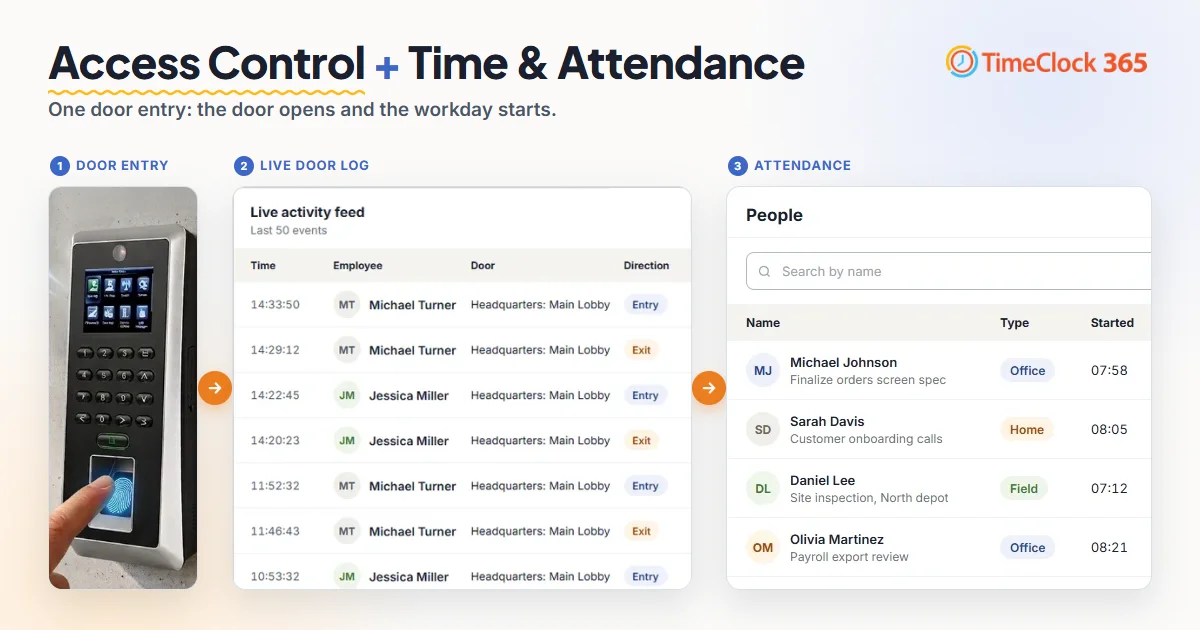
It is one system that opens your doors and records working hours from the same event. In TimeClock 365, door access and attendance share one cloud account, one employee list and one set of groups. When an employee badges in, the door opens, the access log records the entry, and attendance records the start of the workday.
The result: no second time clock next to the door, no copying data between systems, and payroll built on the actual time people arrived.
The problem
Two separate systems, two versions of the day
When door access and time tracking run apart, someone has to reconcile them - every pay period.
Two times for one arrival
The door log says 08:47. The time clock says 09:05, because the employee punched in later. Payroll has to pick one.
Two employee lists
Every new hire is added twice. Every leaver is removed twice - and access that is missed stays open.
Manual reconciliation
HR exports two reports and matches them by hand before payroll. Hours leak in the gaps.
How it works
Door entry → attendance → payroll
One action at the door. Everything after it is automatic.
- 1
Badge in at the door
Card, NFC key fob, fingerprint, face, PIN or Apple / Google Wallet. The controller checks the permission and opens the lock.
- 2
The entry is logged
The event reaches the cloud with person, door and time, and appears live in the door log and the who's-in view.
- 3
Attendance is recorded
The first entry of the day starts the workday. The last exit ends it. Hours land in the employee's timesheet.
- 4
Approve and export to payroll
Overtime and breaks are calculated by the work agreement. Managers approve, reports lock, and payroll gets the export.
Features
Everything for the doors and the hours
Cloud door control
Manage doors, sites and permissions from any browser. Unlock remotely. No local server to maintain.
NFC, mobile and biometric
Cards and fobs, Apple and Google Wallet, fingerprint, face and PIN - one method per door or combined.
Real-time who's in
Who is inside and outside right now - for headcounts, reception and emergency roll-calls.
Door event log
Every entry and exit with person, door and time. Denied attempts are flagged. Filter and export for audits.
Timesheets
Door entries and every other punch in one timesheet. Managers approve timesheets and time off in one place.
Overtime
Daily, weekly and monthly overtime with your rates, night shifts and holiday eves - calculated automatically.
Payroll export
Excel, CSV, PDF, QuickBooks, HiBob, GreytHR and more. Lock reports so nothing changes after payroll runs.
Microsoft Teams
Who's in and the live door log inside Teams. Employees can also punch in from the same free Teams app.
Works offline
Permissions live on the controller. Doors keep working without internet, and events sync when it returns.
One employee list
Add once. Revoke once.
Access control and attendance use the same people, groups and permissions. A new hire gets door access and a timesheet in one step. When someone leaves, deactivating them removes access from every door - no cards to chase and no second system to update.
- One account for doors, hours, time off and payroll export
- Several sites grouped by building, floor or branch
- Staff who don't pass a door clock in from the mobile app, web, Teams or a biometric clock
- ISO 27001 certified, 12 languages, used in 20+ countries
Can access control track employee attendance?
Yes - when both run in one system. In TimeClock 365 the door entry is the clock-in: the first entry starts the day and the last exit ends it. You see who arrived, when and through which door, in the same reports you use for payroll.
Pricing
Attendance + Access Control: $4.90 per user / month
Billed annually, or $6.10 per user / month billed monthly. Includes everything in Attendance and everything in Door Access Control. Door hardware is quoted per building. Mobile wallet keys (Apple & Google Wallet) - pricing on request. Doors only? Door Access Control starts at $1.90.
Access control and time attendance - FAQ
Can access control track employee attendance?
Yes. In TimeClock 365, door access control and time & attendance run in the same account, so a door entry can count as the clock-in. The first entry of the day starts the workday and the last exit ends it. Each record keeps the person, the door and the time.
Can access control integrate with payroll?
Yes. With TimeClock 365, hours that start from door entries go into the same timesheets as every other punch. Overtime, breaks and absences are calculated by each employee's work agreement. Managers approve and lock the reports, then export to Excel, CSV, PDF, QuickBooks, HiBob, GreytHR and other payroll formats.
What is integrated time attendance and access control?
It is one system that both opens the doors and records working hours. TimeClock 365 uses one employee list, one set of groups and one cloud account for both, so a single door entry creates the access log entry and the attendance record. There is no second terminal and no data to copy between systems.
Do I need two systems for door access and time attendance?
No. TimeClock 365 combines cloud door access control and time & attendance in one platform. Doors, readers, permissions, timesheets and payroll export are managed from the same browser dashboard, with no local server.
How much does access control with time and attendance cost?
TimeClock 365 Attendance + Access Control is $4.90 per user per month billed annually, or $6.10 billed monthly. It includes everything in Attendance and everything in Door Access Control. Door hardware is quoted per building, and mobile wallet keys (Apple and Google Wallet) are priced on request.
Which credentials can clock employees in at the door?
TimeClock 365 door readers accept RFID and NFC cards and key fobs, fingerprint, face recognition, PIN code, and Apple Wallet or Google Wallet on a phone. Employees who do not pass a door, such as field or remote staff, can clock in from the mobile app, the web portal, Microsoft Teams or a biometric time clock.
Can I see who is in the building right now?
Yes. The TimeClock 365 Access Dashboard shows who is inside and who is outside, the latest door events and any alerts, in real time. The same Who's in view is available in the free TimeClock 365 app for Microsoft Teams.
What happens to attendance if the internet goes down?
Doors keep working. TimeClock 365 stores users and permissions on the door controller and saves access events on the device, then syncs them to the cloud when the connection returns.
Is TimeClock 365 secure?
TimeClock 365 is ISO/IEC 27001:2022 certified. Every door event is logged, admin roles control who can change permissions, and the platform is used in 20+ countries in 12 languages.
Related
See one door entry become a payroll-ready hour
Book a 30-minute demo - we'll show the doors, the live log, the timesheet and the payroll export in one TimeClock 365 account.