Plan·$8.50 per user/month(€7.80 · billed annually)

Field Teams: know where your crews work and what to pay them

Field employees punch in from their phone with GPS. You see who is working now on a live map, get each person's route for the day, and hours flow into attendance reports and payroll export - in one plan, at one price per user.

  • Field Teams plan
  • Switch on in your demo - free
  • ISO 27001 certified
Field team · Today3 working now

Geofencing rule

  • DL
    Daniel LeeNorthside Clinic · in 07:12
    On site
  • AC
    Ava Collins800 m from Harbor Mall · in 08:02
    Outside · notified
  • RF
    Ryan FosterOn the road · in 06:55
    Moving
  • GH
    Grace HallOut 16:40 · 8:05 h today
    Off work

Ryan Foster · route today

  1. 06:55 Punched in · Depot
  2. 07:40 Arrived · Northside Clinic
  3. 11:20 Arrived · Westgate Office
  • Daniel Lee arrived at Northside Clinic07:38
  • Ava Collins punched in outside the site area08:02
  • Grace Hall turned GPS off16:41

Try it - change the geofencing rule, refresh locations, switch tabs. Sample data.

What is the TimeClock 365 Field Teams plan?

Field Teams is the TimeClock 365 plan for mobile and field workforces, for $8.50 per user/month, billed annually (or $10.60 per user/month billed monthly). It includes everything in the Attendance plan - mobile and 7 other clock-in methods, time off, automatic break deduction, overtime rules and payroll export - plus real-time GPS tracking, route and trip history, geofencing zones, location-based attendance alerts and remote mobile team management.

It is built for companies whose people start the day at a customer, a job site or on the road rather than at an office door. TimeClock 365 is ISO 27001 certified, works in 12 languages and is used in 20+ countries.

Benefits

Why teams add Field Teams

Hours you can trust

Every punch from the mobile app carries a GPS location, and geofencing decides what happens when someone punches away from the site.

See the whole team at once

A live map of who is working now, plus route and trip history - without calling around.

Straight to payroll

Field hours land in the same attendance reports, overtime rules and payroll export as everyone else.

How it works

Up and running in 4 steps

  1. 1

    Start a free trial

    Or switch on Attendance Pro and the Location Tracker add-on in your demo.

  2. 2

    Add your sites

    Add customers and job sites in Customers & Locations, each with a radius.

  3. 3

    Set the location rules

    In the work agreement, require GPS on punches and choose the geofencing rule.

  4. 4

    Crews punch in from the app

    Managers see the live map, routes and alerts; hours flow to reports and payroll.

Features

Field Teams features

Real screens from the English TimeClock 365 demo account, with sample data.

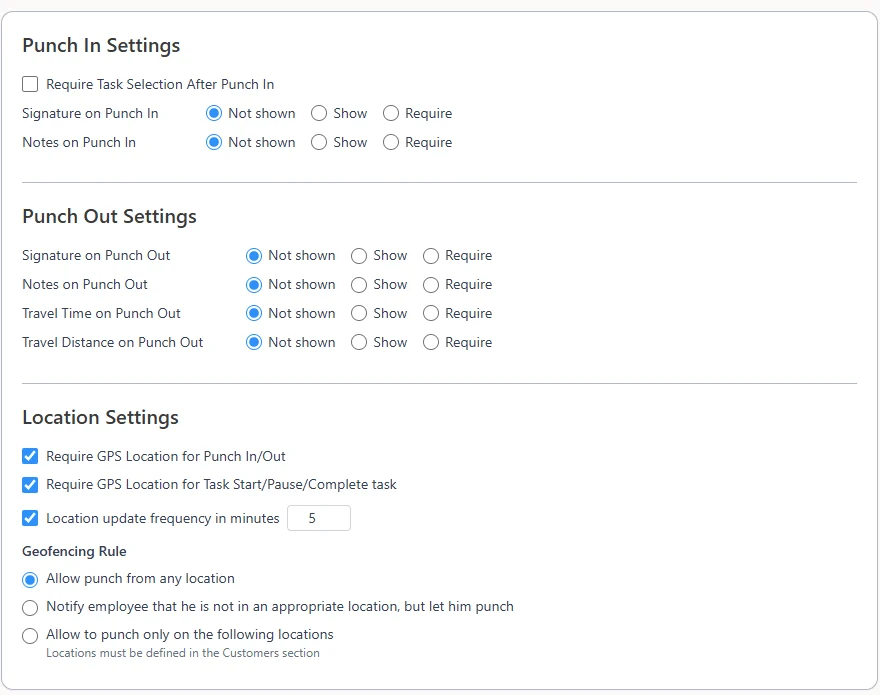
Mobile app clocking settings: punch in and punch out options, Require GPS Location for Punch In/Out and for tasks, location update frequency in minutes and the geofencing rule

GPS on punches and geofencing rules

Require a GPS location for punch in and out and for task start, pause and complete, set how often the location updates, and choose the geofencing rule: allow anywhere, notify the employee, or allow punches only at defined locations.

Learn more →
Dashboard Waiting for your action list with vacation, reserve duty, time edit and expense requests and Actions menus

Approvals from anywhere

Time off, time edits and expense requests wait on the manager's dashboard with any attached file. Approve or reject from the Actions menu.

Read the guide →

Live map and route history

See who is working now on a map, and each employee's route and trips for the day.

Learn more →

Location-based alerts

Get an alert when selected employees arrive at or leave a customer's area, or turn their phone's GPS on or off.

Everything in Attendance

Clock-in by app, web, Microsoft Teams, Slack, biometric, NFC, GPS or PIN, time off, automatic breaks, overtime rules and payroll export.

Learn more →

Construction and field services

Running job sites with door access, subcontractors and crews? See how TimeClock 365 works for construction.

Learn more →

Who it's for

Built for the people who run the day

Field service and maintenance

Technicians go from customer to customer; you see arrivals, routes and hours.

Construction crews

Punches only at the job site, with hours ready for payroll.

Cleaning and facility services

Staff spread over many locations, each with its own area.

Payroll and operations managers

Overtime and payroll export for field and office staff in one report.

Compared with

Field Teams vs. paper timesheets and phone calls

TaskPaper timesheets & phone callsTimeClock 365 Field Teams
Knowing who startedCalls and text messagesPunches with a GPS location from the mobile app
Time at the right siteTrust the timesheetGeofencing: allow, notify or only allowed locations
Where the team is nowCalling aroundLive map of who is working now
The day's routeDriver's notesRoute and trip history per employee
PayrollTyping hours from paperAttendance reports, overtime rules and payroll export

Frequently asked questions

What is the TimeClock 365 Field Teams plan?

Field Teams is the TimeClock 365 plan for mobile and field workforces. It includes everything in the Attendance plan - clock-in from the mobile app and 7 other methods, time off, automatic break deduction, overtime rules, payroll export and attendance reports - plus real-time GPS tracking, route and trip history, geofencing zones, location-based attendance alerts and remote mobile team management.

How much does the Field Teams plan cost?

TimeClock 365 Field Teams costs $8.50 per user/month, billed annually (€7.80 per user/month, billed annually), or $10.60 per user/month billed monthly. Every user on the plan gets all of its features, and you can start with a 14-day free trial.

Which time tracking software provides GPS tracking for field workers?

TimeClock 365 Field Teams records the GPS location of every punch from the mobile app, shows who is working now on a live map, keeps each employee's route and trip history, and sends alerts when selected employees arrive at or leave a customer's area. Hours flow into the same attendance reports and payroll export as the rest of the team.

What is geofencing for employee time tracking?

Geofencing sets an area around each work site. In TimeClock 365 you add sites in Customers & Locations with a radius, then choose a rule in the work agreement: allow punches from any location, let the employee punch but notify them that they are not at an allowed location, or allow punches only at the defined locations.

Can employees clock in from their phone with GPS verification?

Yes. With TimeClock 365 you can require a GPS location for every punch in and out from the iPhone or Android app, and for task start, pause and complete. The geofencing rule decides whether a punch outside the site area is allowed, flagged or blocked.

What is the difference between the Field Teams plan and the Field Team Tracking add-on?

Field Teams is a complete plan: Attendance plus GPS tracking for $8.50 per user/month, billed annually. Field Team Tracking is the same GPS tracking as an add-on ($5.50 per user/month, billed annually) for companies that already have another TimeClock 365 plan. If your whole team works in the field, the Field Teams plan is the simpler choice.

Is employees' location tracked all the time?

No. In TimeClock 365, continuous location tracking runs only during working hours, only for the employees you enable, at the interval you set in minutes. Outside work, only punches carry a location.

Can managers get alerts about field employees?

Yes. Create an alert to be notified when selected employees arrive at or leave a customer's area, or turn their phone's GPS on or off.

What do field employees need?

The free TimeClock 365 app for iPhone or Android, GPS turned on, and location permission for the app. Managers use the web portal or the same app.

Put your field team on the map

Switch on Attendance Pro and the Location Tracker add-on in your TimeClock 365 demo and try it with sample data - or let us walk you through it.

Contact our sales team