
TimeClock 365 vs Brivo: cloud doors, plus the hours behind them
Brivo and TimeClock 365 both run your doors from the cloud. TimeClock 365 adds what security platforms usually leave to another system: attendance from every door entry, payroll-ready hours and a published per-user price.
- From $1.90 per user
- Fingerprint, face, card & wallet
- Attendance built in
At a glance
How do TimeClock 365 and Brivo differ?
Brivo is a cloud-based access control platform for commercial, multi-tenant and multi-site buildings. It manages cards, fobs and mobile credentials in Apple Wallet and Google Wallet, integrates with video and identity systems, and is usually sold and installed through security dealers.
TimeClock 365 is cloud door access control with attendance built in. Doors open with a fingerprint, face, card, PIN or a phone key in Apple or Google Wallet - and because access and attendance share one account, the first door entry of the day can start the workday and the last exit can end it, ready for payroll.
Feature comparison
TimeClock 365 vs Brivo, side by side
| Feature | TimeClock 365 | Brivo |
|---|---|---|
| Cloud management | Yes - browser and mobile, every site in one account | Yes - Brivo Access, cloud-managed |
| Cards and key fobs | Mifare and DESFire; HID on supported readers | Yes - cards and fobs |
| Apple / Google Wallet keys | Yes - add-on, pricing on request | Yes - Apple Wallet and Google Wallet credentials |
| Fingerprint and face readers | Yes - our own readers, managed in the same cloud | Phone biometrics for multi-factor; biometric readers through partners - check with Brivo |
| Remote unlock | Yes - from the web portal or phone | Yes - Brivo app and portal |
| Visitor management | Add-on - $122 / month flat | Yes |
| Attendance from door entries | Built in - first entry starts the day, last exit ends it | Not a core feature - usually a separate time-tracking tool |
| Timesheets and payroll export | Built in - overtime rules and payroll exports | Not a core feature |
| Leave, HR and tasks | Same account - leave, employee files, tasks | Not a core feature |
| Published pricing | $1.90 / user / month (annual); $4.90 with attendance | Quote only - sold through dealers |
Based on publicly available information as of 2026. Features and pricing change - verify with each vendor.
Why teams choose TimeClock 365
One account for doors, people and hours
Attendance from the door
The first entry starts the day and the last exit ends it - no extra time-clock system.
Our own biometric readers
Fingerprint and face readers managed in the same cloud as cards and wallet keys.
Published per-user price
$1.90 per user per month, billed annually - no dealer quote needed to know the software cost.
Payroll-ready hours
Overtime rules, approvals and payroll exports straight from door entries.
Built for HR and operations
Leave, employee files and tasks next to door permissions - not only for the security team.
Works offline
Permissions are stored on the controller, so doors keep opening if the internet drops.
Access + attendance
The door is the time clock
With most access control systems, door logs and timesheets live in different products. In TimeClock 365 they are the same record.
- First entry starts the workday, last exit ends it
- Overtime rules and approvals on the same data
- Payroll export without re-keying hours
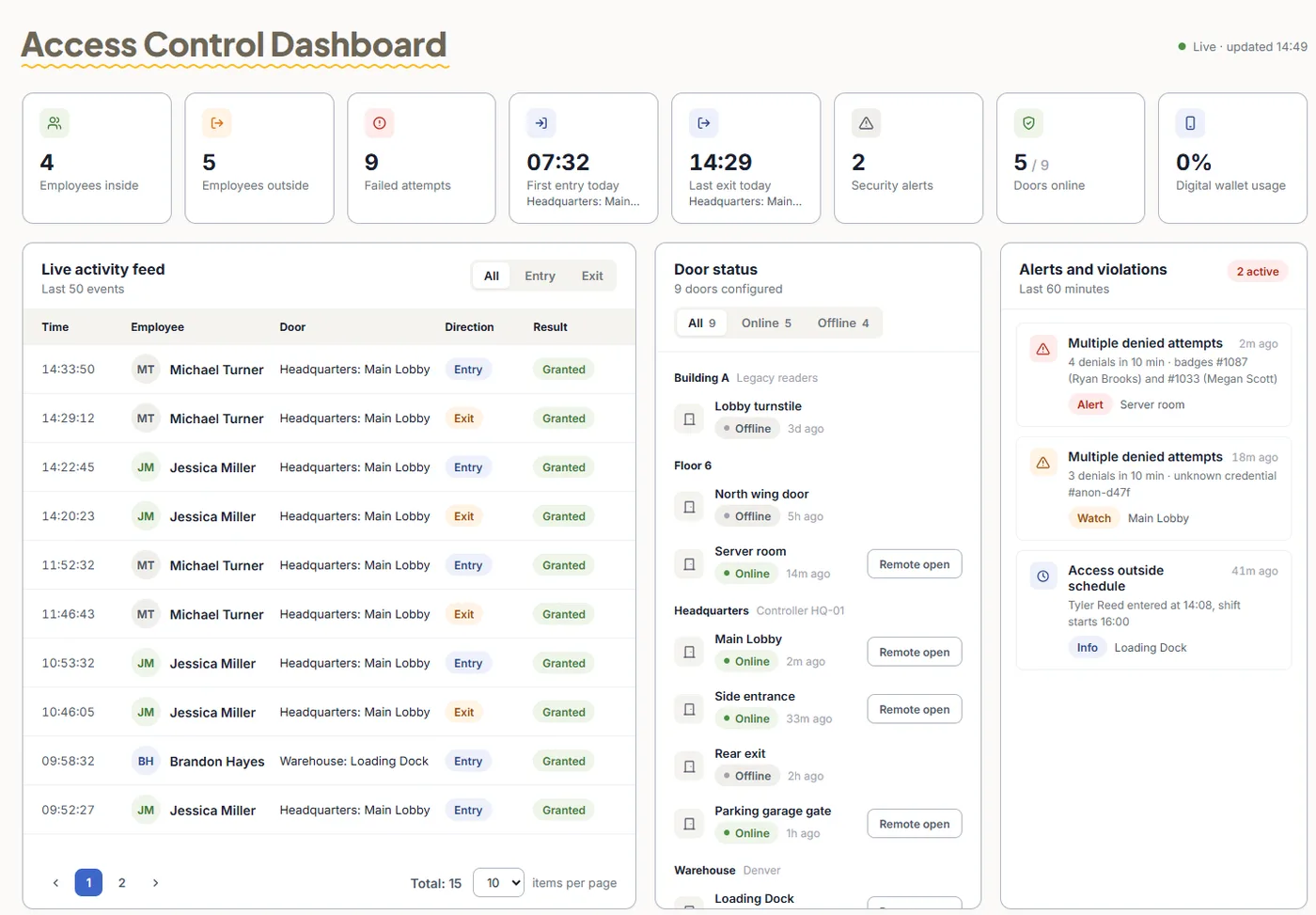
- Live dashboard - who is inside, failed attempts, alerts
A fair comparison
When Brivo may be the better fit
- You manage a large multi-tenant property and need tenant-level access features.
- Your security dealer already installs and services Brivo across your portfolio.
- You need door access only and already have an attendance and payroll system.
Pricing
Door access control from $1.90 per user / month
Billed annually, including fingerprint, face, card and PIN access. Attendance + Access Control is $4.90. Mobile wallet keys are an add-on - pricing on request. Readers and controllers are quoted per building.
Frequently asked questions
What is the main difference between TimeClock 365 and Brivo?
Both are cloud door access control platforms. Brivo is a security-focused platform used widely in commercial and multi-tenant buildings, sold through dealers. TimeClock 365 combines door access with attendance: the entry that opens the door can also start the workday, with timesheets, overtime and payroll exports in the same account.
Does Brivo include employee attendance tracking?
Time and attendance is not a core part of Brivo's access control product, so companies that need timesheets usually add a separate system. In TimeClock 365, the first door entry starts the workday and the last exit ends it. Check Brivo's current offering directly.
Do both support Apple Wallet and Google Wallet?
Yes. Brivo offers mobile credentials in Apple Wallet and Google Wallet. TimeClock 365 also supports employee keys in Apple Wallet and Google Wallet on NFC wallet readers - as an add-on, pricing on request.
Which is better for biometric doors?
TimeClock 365 supplies its own fingerprint and face recognition readers, managed in the same cloud account as cards and phone keys, and the same scan can record attendance. With Brivo, multi-factor commonly uses the phone's own biometrics, and biometric readers come through partners - check the options for your site with Brivo.
How does pricing compare?
TimeClock 365 publishes its price: Door Access Control is $1.90 per user per month billed annually, or $4.90 with attendance. Brivo is typically quoted through an authorised dealer. Door hardware for both is quoted per building.
Can I switch from Brivo to TimeClock 365?
Yes. Our team reviews your doors and existing hardware and recommends the TimeClock 365 controllers and readers you need. Employees can sync from Azure AD, Okta or HiBob, and access groups are set up in the cloud.
Do TimeClock 365 doors work if the internet goes down?
Yes. Permissions are stored on the controller, so doors keep working during an outage and events sync to the cloud when the connection returns.
Related
Compare it on your own doors
Book a 30-minute demo - we'll show fingerprint, card and phone entry, and how entries become timesheets.