
Time clock integration with QuickBooks
Stop retyping timesheets. TimeClock 365 sends approved hours - with overtime and absences already calculated - straight to QuickBooks Online.
- No file imports
- Manager-approved hours
- ISO 27001 certified
What does a QuickBooks time clock integration do?
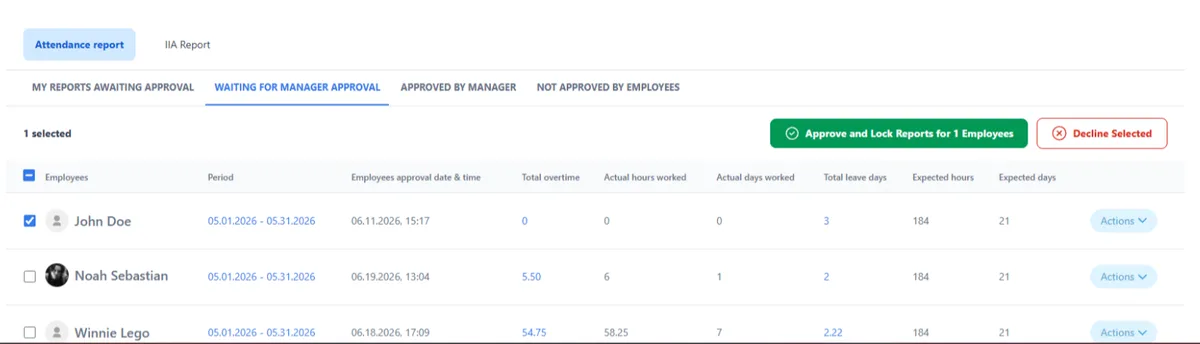
It moves the hours your employees worked into QuickBooks without anyone copying numbers. Employees punch in, managers approve, and the totals land in QuickBooks ready for payroll.
With TimeClock 365 the hours are already final when they arrive: overtime, night shifts, breaks and absences calculated by each employee's work agreement. Fewer corrections, no payroll leakage from manual entry.
How it works
From punch to QuickBooks in four steps
- 1
Employees punch in
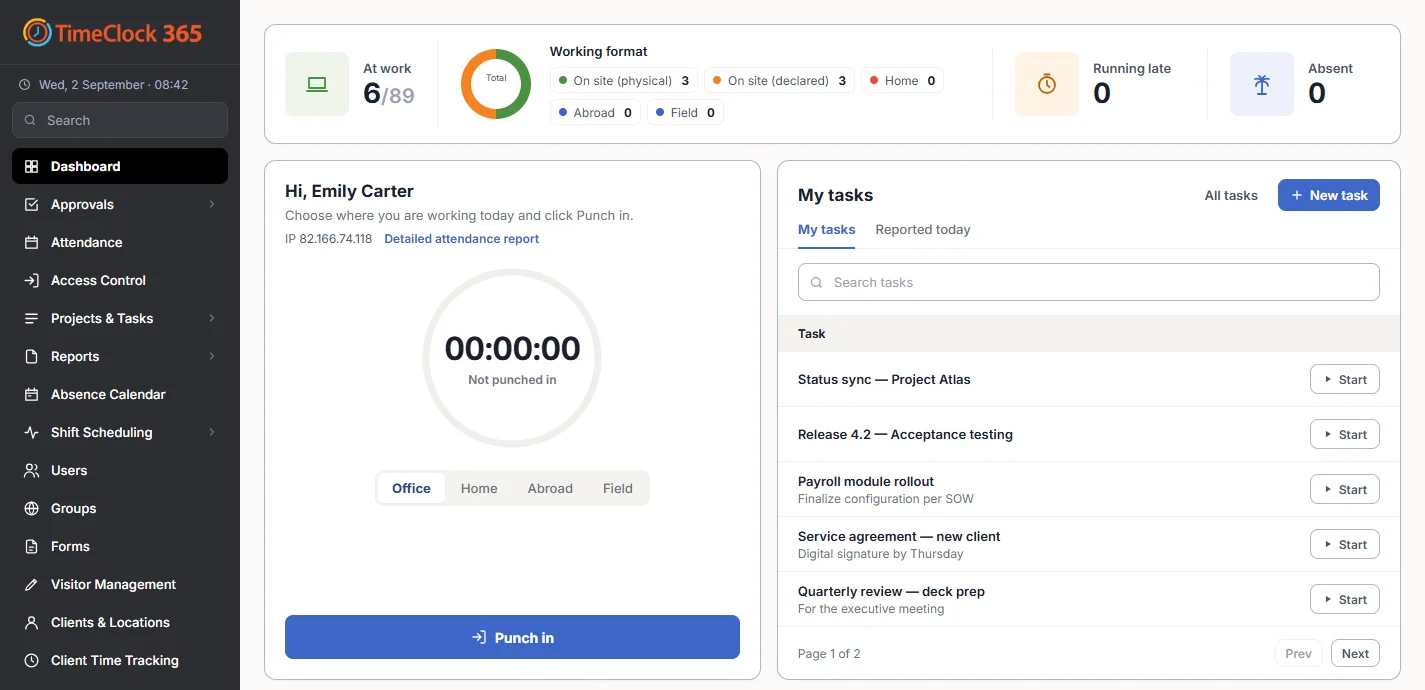
At the door, a time clock, the app, Teams or the web.
- 2
Rules applied
Overtime, breaks and absences from each work agreement.
- 3
Managers approve
Missing punches blocked, reports locked after payroll.
- 4
Send to QuickBooks
Approved hours go straight to QuickBooks Online.
Time clocks that work with QuickBooks
Every clock-in method, one QuickBooks export
The door
With TimeClock 365 access control, door entries become attendance.
🖐Biometric time clock
Fingerprint or face - no buddy punching.
📱Mobile app
iOS and Android with GPS and geofence.
💬Teams & Slack
Punch in where your team already works.
🧩Chrome extension
One click from the browser toolbar.
🌐Web portal
Any browser, limit to the office IP if needed.
Payroll-ready
Clean numbers, every pay period
- Overtime rates and night shifts calculated before export
- Payroll codes per rate for salaried, hourly and part-time staff
- Custom pay period - for example the 27th to the 26th
- Report locking so nothing changes after payroll is run
- Excel and CSV for any other system
Pricing
Door access control from $1.90 per user / month
Attendance from $3.90, Attendance + Access Control $4.90 per user / month, billed annually. 14-day free trial, no credit card.
Frequently asked questions
Does TimeClock 365 integrate with QuickBooks?
Yes. TimeClock 365 sends approved attendance hours straight to QuickBooks Online - no file to download and import. Overtime, breaks and absences are already calculated by each employee's work agreement, so QuickBooks receives payroll-ready hours.
Which time clocks work with QuickBooks?
Every TimeClock 365 clock-in method feeds the same attendance report that goes to QuickBooks: biometric fingerprint and face time clocks, door readers with TimeClock 365 access control, the iOS and Android app with GPS, the web portal, Microsoft Teams, Slack and the Chrome extension.
Is overtime calculated before the export?
Yes. Overtime rates, night shifts, breaks and absences are calculated by the rules in each work agreement before export. You can also set payroll codes per rate.
Can managers approve hours before they go to QuickBooks?
Yes. Managers approve attendance reports, you can block approval of reports with missing punches, and lock reports after a set date so nothing changes after payroll is run.
What if we use QuickBooks Desktop or another payroll system?
Direct sending is to QuickBooks Online. For other systems, download the attendance report as Excel or CSV, or use the ready-made files for HiBob, GreytHR, Hilan and other payroll systems.
Can attendance come from door access?
Yes. TimeClock 365 is a cloud door access control system first. With Attendance + Access Control, the first door entry can start the workday and the last exit can end it, and those hours go to QuickBooks like any other punch.
How much does it cost?
Attendance starts at $3.90 per user per month and Attendance + Access Control is $4.90 per user per month, billed annually. Door access alone starts at $1.90. There is a 14-day free trial with no credit card.
Related
See hours flow into QuickBooks
Book a 30-minute demo or try the full platform free for 14 days.