An overview of work agreements (contracts) in TimeClock 365 - what each section of settings controls and how they affect employee attendance calculation.
Assigning a user to a work agreement
- Click Users, then click the employee you want to assign to a work agreement.
- Scroll down to the "Contract information" tab and assign the work agreement you want.
A separate guide explains how to assign an employee to a work agreement starting from a specific date.
Creating a work agreement
- Go to Contracts and click "Create new contract" at the top. Alternatively, click "Duplicate" to copy an existing contract and modify it.
- Assign employees to the new contract, and tick "Main" if it should be the main contract. Only one contract can be set as main, and every new employee you create is automatically assigned to it.
- Check the details and click Save.
General agreement details
| Field | Explanation |
|---|
| Agreement name | Identifying name for the work agreement |
| Agreement type | The type of agreement - for example hourly, global, etc. |
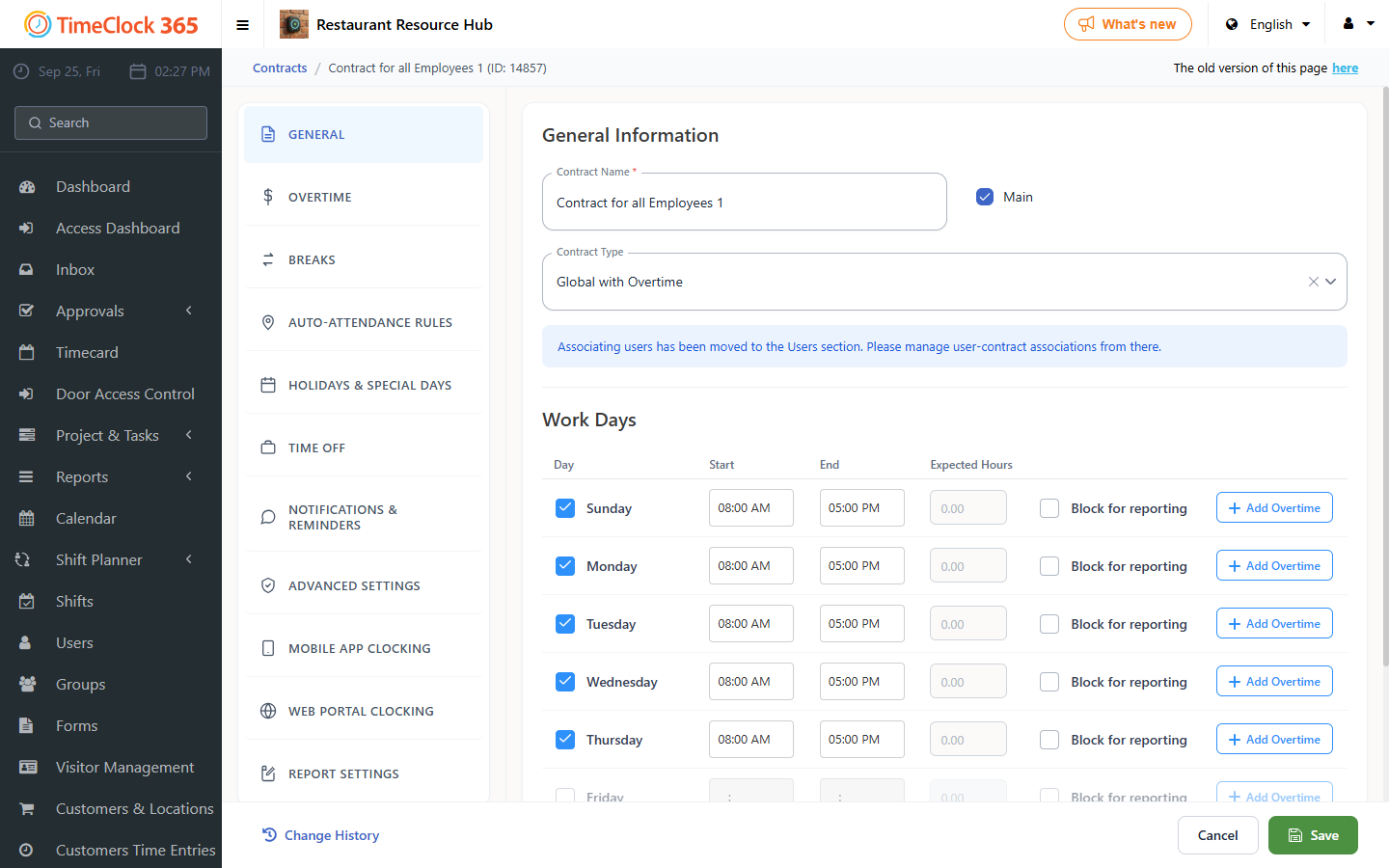
Work days and hours
| Field | Explanation |
|---|
| Work days | Check the standard work days |
| Start / End | Start and end times for each day |
| Block web reporting | Blocks the employee from reporting through the web on a specific day |
Overtime
| Field | Explanation |
|---|
| Overtime percentages | Pay percentage for overtime (125%, 150%) by tier |
| Weekly overtime | Overtime calculation by week |
| Monthly overtime hours | Calculation by month, and how many hours the employee worked beyond the monthly standard |
| Base hours for calculation | The employee's standard hours per month |
| Deduct break hours from total hours worked | Whether to deduct breaks from total hours |
| Limit overtime (day/week/month) | Limits on manually reported overtime by day/week/month |
Rounding and auto-completion
| Field | Explanation |
|---|
| Hour rounding | Rounds clock-in/clock-out times by fixed rules |
| Auto-complete day with absence | Fills the remaining hours as absence |
| Autocomplete every day | Applies auto-completion daily |
| Autocomplete previous month at | Day/time when the system completes the previous month |
Time Off
| Field | Explanation |
|---|
| Absence type | Types of leave (regular, sick, child sick, etc.) |
| Day quota | How many absence days accrue and how often |
| Absence calculation in reports | How to calculate absence days in attendance reports |
| Include non-standard days in count | Whether to include exceptional leave days in the count |
| Payroll software usage code | Internal payroll software code linked to the absence |
Shifts (hours and night)
| Field | Explanation |
|---|
| Night shift start/end | Hours considered a night shift |
| Minimum hours for night shift | Minimum duration to count as a night shift |
| Night shift pay percentage | Extra pay for a night shift |
| Shifts - afternoon / night / holiday eve | Shift names, start and end times, percentages, minimum duration |
Holidays and holiday eves
| Day | Relevant fields |
|---|
| Holiday eve, Holiday, Intermediate festival days, Yom Kippur eve, Yom Kippur, Independence Day eve | Start, end, overtime percentages, block web reporting, attendance report line (100%), absence calculation (full day/half day/custom) |
Breaks
| Field | Explanation |
|---|
| Break deduction by shift length | For example, deduct 30 minutes for a shift over 8 hours |
| Paid lunch time per week / day | Paid meal time per day or week |
Automatic day closing
| Field | Explanation |
|---|
| Close day after X hours beyond standard | Automatically ends the work day |
| Complete the day automatically | When to perform automatic closing |
| Do not close the day | If a report is missing, do not close automatically |
| Complete by standard | Completes based on the fixed hours in the agreement |
Reminders
| Field | Explanation |
|---|
| App / email reminder | Clock-in/clock-out reporting, attendance report approval |
| Group manager reminder | Approving employee reports |
| Days before sending a reminder | For example, 2 days |
| Weekly reminder day / time | Day and time for the weekly reminder |
Clock-in and location reporting
| Field | Explanation |
|---|
| Mobile app / web portal clocking conditions | Required location, signature, notes, travel time/distance |
| Require report source | If a manual report is made - state the reason |
| Location options | Free / with warning / only defined locations |
| Location update frequency | How often the current location is updated |
Reporting and report settings
| Field | Explanation |
|---|
| Do not allow approving a report with missing entries | An incomplete report cannot be approved |
| Do not approve before the period ends | Prevents approving too early |
| Do not approve for IIA reporting without task entries | Requires task reporting for grant/project purposes |
| System lock of reports | Locks reports after a certain date |
| Limit monthly amount of manual reporting | Limit on manual reports for trainees |
