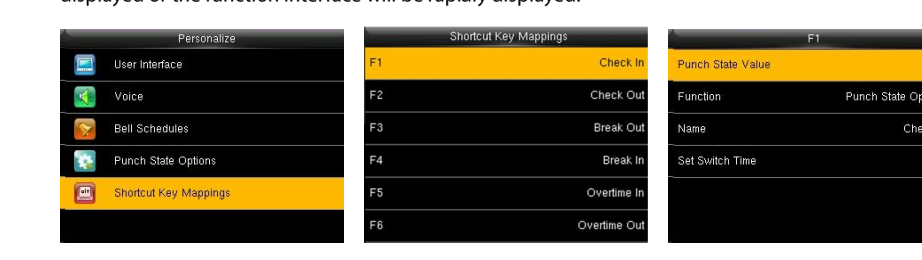
This guide explains how to update the time at which the clock device's status switches to clock-in or clock-out.
- Press M/OK.
- Use the arrow keys and select "Settings".
- Scroll down with the arrows and select "Shortcut key mapping".
- Select "Up arrow key.. Clock in".
- Scroll down and select "Automatic switch setting".
- Select "Choose days".
- Select all the days you want to set a clock-in status switch time for, then press ESC once.
- Press ESC.
- Enter each day separately and set the time you want the status to switch to "Clock in".
- Press ESC twice.
- Repeat the same steps for "Down arrow key.. Clock out" and set the time you want the status to switch to clock out.
For an overview of punch states and modes, see Punch States on a Biometric Clock.