
To make TimeClock 365 email an employee when their manager approves or disapproves a time off request, go to Settings > Contracts, edit the contract, and tick "Send email to user when manager approves/disapproves his Time Off Request". Then click Save. The setting is part of the contract, so repeat it for every contract your employees use.
Employees hear the decision without asking, which means fewer follow-up questions to managers and HR.
Steps
- Go to Settings.
- Click Contracts and edit the contract.
- Open the Notifications & Reminders tab.
- Tick Send email to user when manager approves/disapproves his Time Off Request.
- Click Save.
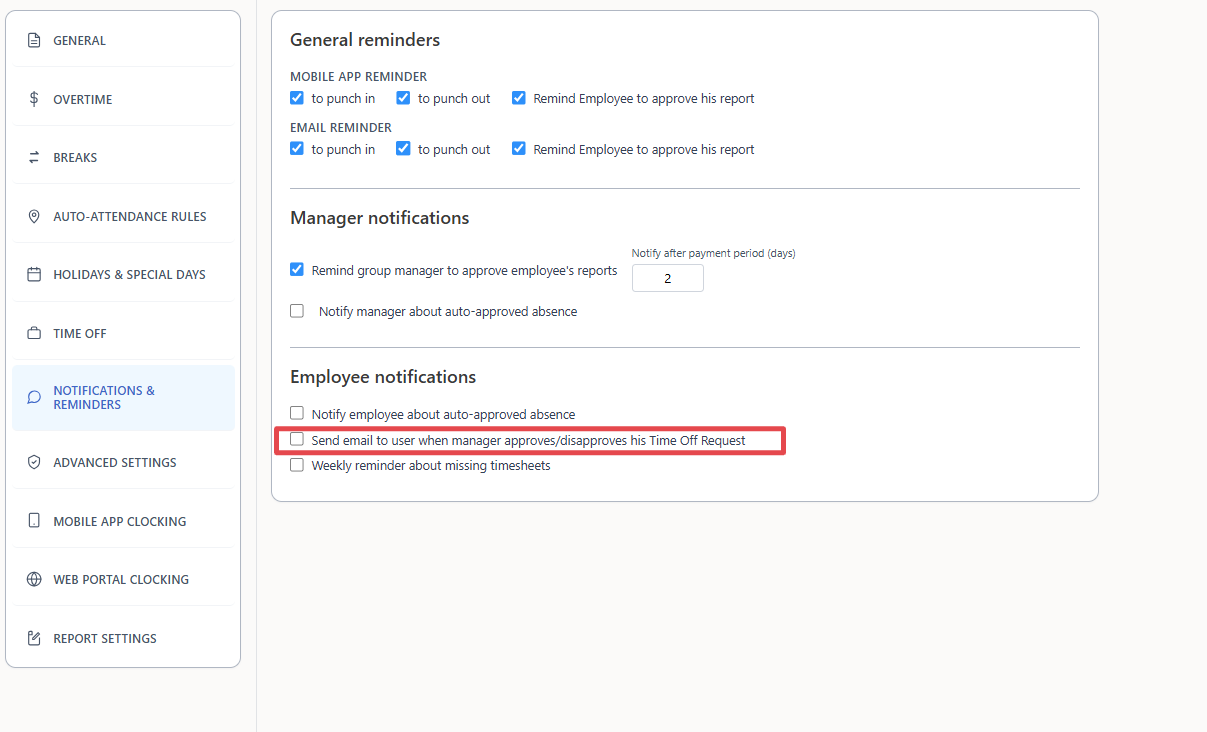
From now on, the employee gets an email telling them whether the request was approved or declined.
The setting is per contract
The checkbox belongs to the contract. If different groups of employees work under different contracts, edit each contract and tick the checkbox in every one.
Related settings on the same tab
Under Employee notifications on the same tab:
- Notify employee about auto-approved absence
- Weekly reminder about missing timesheets
Frequently asked questions
Where is the setting that emails employees about time off approvals in TimeClock 365?
In TimeClock 365, go to Settings > Contracts, edit the contract, open the Notifications & Reminders tab and tick "Send email to user when manager approves/disapproves his Time Off Request". Then click Save.
Is the time off approval email set per employee or per contract?
The setting is part of the contract in TimeClock 365. If your employees work under more than one contract, edit each contract and tick the checkbox in every one of them.
What does the employee receive?
The employee receives an email telling them whether their time off request was approved or declined.
Do I need to enable anything else for managers to approve time off?
No. This checkbox only controls the email to the employee. Managers approve or reject requests in TimeClock 365 under Approvals > Time Off, as described in the Absence Approvals guide.
Can I also notify employees about auto-approved time off?
Yes. The same tab, under Employee notifications, has an option labeled "Notify employee about auto-approved absence".